显示标签为“Autel”的博文。显示所有博文

2019年12月3日星期二

Autel Products,which is suitable:MaxiAP200,AL319,MK808

Autel Maxi AP200 vs Autel AL319, Autel MK808 Tool:

Autel AL319 Autel MK808 Autel AP200

Autel Original MaxiCOM MK808 Diagnostic Tool 7-inch LCD Touch Screen Swift Diagnosis Functions of EPB/IMMO/DPF/SAS/TMPS

              picture


MIL Read MIL Status Read MIL Status Read MIL Status
Live Data OBD Live Data View All Live Data View All Live Data
Testing
O2 Monitor O2 Monitor
Coverage
Most Makes & Models Most Makes & Models
Read/Erase DTCs
All Systems All Systems
Engine Service
Oil Reset/DPF Service Throttle Match
Braking Service
EPB Service EPB/ABS Bleed
Report
Generate Repair Report Generate Repair Report
Operaion System
Android IOS/Android
Body Service
SAS Service SAS/WIN/DR/Roof/Seats
Modification Service
Language Change, Tire, Odometer Change/Change Tire

Battery Replacement, Key Coding
Price $34.88 $499 $69.99
Customer review:
Review 1:
This little thing is nothing short of amazing. I work as a Honda Master Technician at the dealership and was a bit skeptical of all the things claimed this could do.
I’ve been searching for a way to program immobilizer keys for Honda/Acura by using my cell phone for some time now. Have seen other expensive scan tools and bluetooth dongles claiming all the capabilities of this one for at least $150-200 range so when I found this one and at the time was having a lightning deal for $44. I couldn’t pass it up. Tried for the first time the other day on a 2018 Honda Pilot and was just amazed by the things this can do. Will do almost everything the Honda HDS will do. Had the opportunity to try programming a new key on 2006 Pilot so was anxious to see if it will work. So went on to perform key program procedure and worked pretty much identically to using the Honda HDS. I can not recommend this tool enough. Also has the ability to do an all DTC scan and clear all DTCs using a quick erase function without having to go into each individual system. Still trying things out and learning everything its capable of.
Review 2:
Exellent scanner, easy to carry, good range to read from outside the car, easy to use apps. Did everything it said it would. I would recommend to others who have worked on cars long enough to understand what the given information means.
Review 3:
Awesome just a small blue tooth but so powerful. I am Automobile Master tech I bought a lot of scanner in 30 years. But this device not expensive still has more functions than others scaner I had. Thank you I love it.

http://www.obd360.com

2019年7月7日星期日

Autel MD808 Pro FAQs and Customers Real Reviews

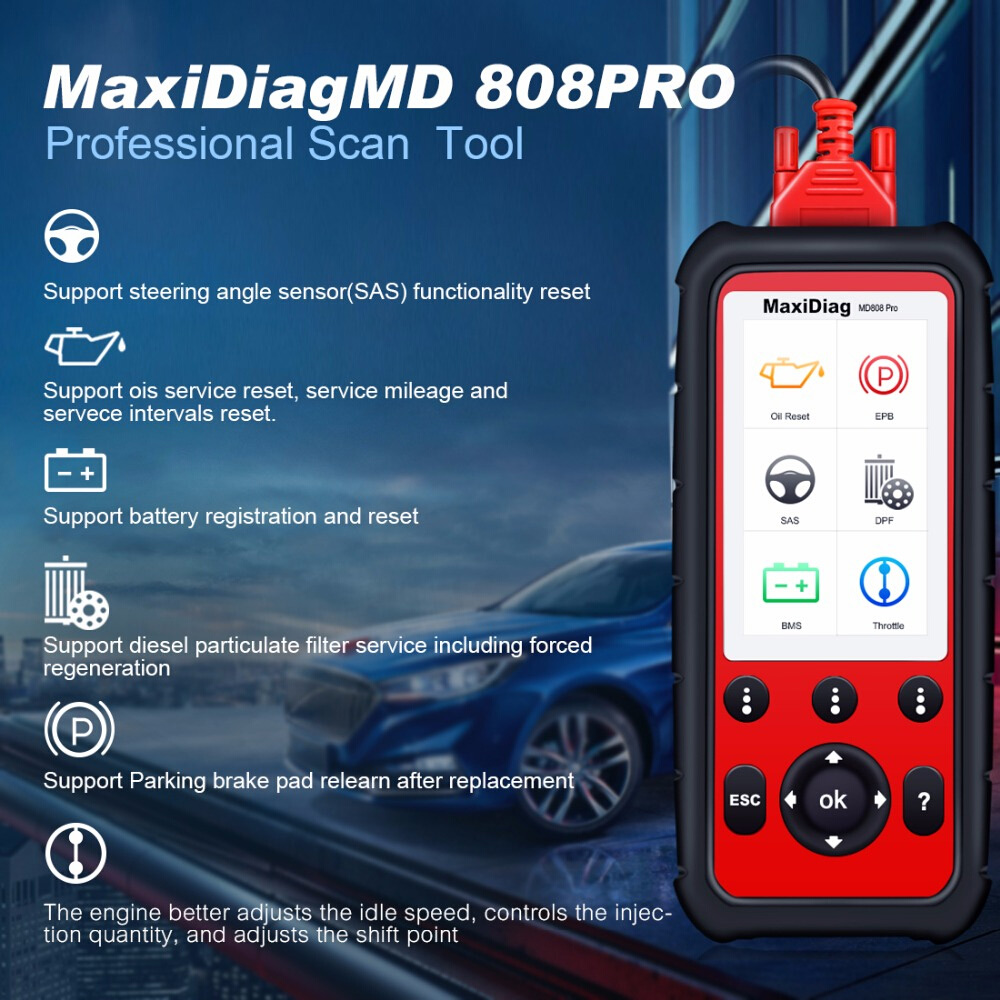
Autel MD808 pro scanner is a nice and sturdy device that will allow you to diagnose different car makes and models as long as they are OBD2 compliant and manufactured from 1996 or newer. This includes domestic, European, and Asian vehicles. The diagnostic scanner is easy to use, compact and affordable. It also performs a wide range of functions making it ideal for DIYers, professional mechanics, and technicians.

The MD808 will help you save money as it offers free lifetime updates and upgrades. You can as well save data on the 16GB memory card and in case of any defects on the product; the manufacturer offers a one-year warranty. I hope this Autel MD808 Pro review will help a lot to make a buying decision.


Autel MD808 Pro FAQs:

Q1: Autel MD808 have any advantage over the MD802?
A1: MD808 is much more advanced than MD802.MD808 supports to read and clear trouble codes, control and test BMS /SAS /DPF systems,and reset steering angle sensor (SAS) functionality. These functions MD802 is unavailable to do.Hope it can meet your demands.

Q2: Will this be able yo bring up Transfer Case codes?
A2: Yes,this md808 can read/erase codes on Engine, Transmission, SRS and ABS system as well as lot of special functions.

Q3: Will this unit interface with all of the modules and eletronic controls on a Toyota Prius? And specifically to meter in coolant and bleed brakes?
A3: This md 808 can work on your Toyota Prius on four systems , if wanna get a all system supported product, you can have a look for the MD802 full system or md808 pro.And for metering in coolant and bleed brakes,you may have a look for Autel MK808.

Q4: Autel launched another new product md808. what’s the differences between md808 pro and md808?
A4: MD808 pro is an more advanced professional scan tool than MD808. Though MD808 and MD808 pro are armed the same hardware, MD808 pro has more powerful built-in software system than MD808 pro. MD808 can only access to Engine, Transmission, ABS, and Airbag (SRS) systems while MD808 pro support Read/Clear Codes and Live Data functions for ALL systems.

Q5: Hi this able to bleed abs system on mb gl550?
A5: It will support reading and clearing all codes in all modules. But it would not support the brake bleeding functions. I think you need MX808 to bleed abs system.

Q6: Shops that would use Autel MaxiDiag MD808 Pro?
A6: General repair shops (Perfect for servicewriters), body shops, used car dealerships, auto repair shop, brake facilities, DPF Auto Repair shop, and transmission repair shops

Q7: How do I know if my Autel scanner is genuine or not?
A7: First and foremost, you should buy an Autel scanner from an authorized dealer. If you buy it from an unknown source, you risk being duped or being sold the wrong product. Every Autel scan tool comes with a serial number. After you purchase the device, you need to register it in order to get free software update/upgrade and as well as warranty. As a result, if you try to register the code reader with Autel and it fails, just know that your device is counterfeit. All-in-all, Autel is a reliable company and having a fake product is next to impossible.

Q8: Does the Autel MD808 offer its users with free lifetime updates?
A8: This is where Autel wasn’t clear about its product. In the description, it is written that the product comes with free lifetime updates but it is not. Most users have stated that the free software updates are provided for 3 years and from then onwards, you will have to pay for updates and upgrades. The manufacturer should be clear about this so that buyers are not duped into buying the product.

Q9: I am looking for a scanner that would let me access the onboard computer so that I am able to adjust the vehicle performance which would maximize my fuel economy. Will this model do this procedure or can you suggest a model that can do this
A9: MD808 Pro will tell which fuel injector is faulty and It also able to read fuel trim. If you want full functioning scanner, then you have to increase your budget. You can take a look at the Autel MX808

Q10: This MD808Pro would not link up to a new 2019 Toyota Tacoma. I called US support and was told that I would have to wait at least one year for the update to the device that will cover this and other new vehicles. The support person told me that I would purchase a much more expensive reader with a paid subscription to be able to interact with new vehicles. Thanks Autel for not advising this in your advertising for this product. This MD808Pro will be sitting in my cupboard collecting dust for at least one more years.
A10: Yes, that’s right. If you buy the most recent car model, then low price scanner like Autel md808 pro will not support. They need time( at least one year) to include that new car model with the scanner. All scanner brands follow that type of tactic. Because they need to write a new program for the latest car model to support the scanner


Autel MD808 Pro Reviews:

Review 1:
I did try it out and it did work very well. I work as a gm technician and i use the ms906ts model from autel and they both seem to read the same data. I would recommend any autel product to anyone. They have great products and great technical support. I did the current update on this unit which was simple. The newest update gave you the feature to do the updates through usb. I had to remove the mico sd card to do the updates the first time. You will need a micro sd to sd card adapter if you get a unit with the older software installed.

Review 2:
Autel MD808 Pro was recommended by tire shop because it’s a well made quality product capable of high speed use for sports cars. Product installed and programmed easily for use in my ’06 corvette.

Review 3:
I purchased this to help diagnose an ABS issue and to clear the trouble code(s) when the issue was fixed. It handled these tasks without issue. The ability to see sensors operate in real time and plot them on a graph is invaluable.

Review 4:

This is a new launched product of Autel. My friend bought a MD802 which works very good. This one is an updated version of MD802. It has a bigger screen and memory, and seems the scanning speed is a little bit faster scanning all systems. A very good diagnostic tool.

Review 5:
It clears code fast and works well. It’s an all system diagnostic tool and easy to use. The 16G memory card which enables update is a plus compared to MD802. Though it’s not a bi-directional tool, we won’t get that at this price.

http://www.auteleshop.com/wholesale/autel-maxidiag-md808-pro-all-system.html

2019年6月19日星期三

How to Update Autel MaxiCheck Pro Software?

Here auteleshop.com share the software update procedures of Autel MaxiCheck Pro,hope it helps!


Procedures:
This function allows you to update the scan tool software through a computer.
Register the Tool
User would update the scan tool ONLY after you had registered the
tool on our website http://pro.autel.com. Then you could download
software, update online, retrieve information and get warranty service.
You can use a Mac or a Windows-based computer to download the
suitable version and proceed.

NOTE: Prior to registration, please confirm your network is working properly.
1. Visit our website http://pro.autel.com.
2. On the Sign In page, input your account ID and other information to log in, if you already have an account.
3. If you are a new member to Autel and do not have an account yet, click the Create Autel ID button on the left side.
4. Enter the required information in the input fields, read through Autel’s Terms and Conditions and tick on Agree, and then click Create Autel ID at the bottom to continue.
5. The online system will automatically send a confirmation email to the registered email address. Validate your account by clicking the link provided through the mail. A product registration screen opens.
6. Select the product model of your tool, enter the product serial number and password on the Product Registration screen, and click Submit to complete the registration procedure.
NOTE: Please use the About function to find out the Product Serial No. and Register Password.

Update Procedure
Autel frequently releases software updates that you can download. The Update feature makes it very easy to determine and get exactly what you need.
1. Install Maxi PC Suite through the included CD, or download the applications in our website: www.autel.com or our distributors’ site. You can use a Mac or a Windows-based computer to download the suitable version and proceed.
2. Make sure that your computer is connected to the Internet.
3. Load the SD card of the scan tool to your PC.
4. Run the Maxi PC Suite. Wait for the Log In window to pop up


5. Enter your Autel ID and password and wait for the Update window to display. If you forget your password unintentionally,you may always click the [Forget Password?] to link to our website and get your password back.
6. Select the product type and serial number, click OK to continue.
7. In the Update window, select the items you want to install.Usually, you should install all available updates.


Generally, there are two ways to update MaxiCheck Pro programs:
Batch Update
Select the programs that you would update by clicking on the check boxes next to those items. Then click the Update Selected Items button on the right side of screen.

Or, click on the Select All checkbox on the right side of screen and all updatable items will be selected automatically. Then click the Update Selected Items button on the right side of screen.

Check the updating process by observing the upper left progress bar [Downloads] and upper right progress bar [Installs]. You may also find progress information in the Status column of updated items.

Anytime you could click the Pause button on the right side of screen to suspend all progresses, and the state of those suspended items would change to stopped.

To resume updating process, you may need to select those suspended items again, and then click the Update Selected Items button. The progress will resume from the break point.

When the downloading is completed, the downloaded programs will be installed automatically. The new version will replace the old version.

Single Update
Find out the desired updating item and click the Install button in the same line. With updating in progress, the Install button changes to Pause.

Check the updating process by observing the upper left progress bar [Downloads] and upper right progress bar [Installs]. You may also find progress information in the Status column of updated items.

Anytime you could click the Pause button in the line to suspend this progress, and the state of this item would change to stopped.

To resume updating process, click the Install button in the line again. The progress will resume from the break point.

When the downloading is completed, the downloaded program will be installed automatically. The new version will replace the old version.

And for more details,please check here:
http://www.auteleshop.com/wholesale/autel-maxicheck-pro.html

2018年11月6日星期二

Chrysler Diagnosis by Autel MaxiDiag MD808 Pro

Got one Autel MaxiDiag MD808 Pro to play with, it’s really a very good tool and I recommend it, so I’d like to share what I can do with it.

For more Autel Tools,check here:Original Autel Diagnostic Tool
Hardware:
A really nice case, hard plastic case.
autel-maxidiag-md808-pro-review-on-2015-dodge-ram-01