2019年5月16日星期四

XTOOL PS90 Features, Activation, Update and Review

Obd360 will show you XTOOL PS90 main features, support language, how to get activation code, how to update and offer you customer review on this product.


What’s the main feature of PS90?
Scans engine, Reads/Clears fault codes, Auto key programming/immobilizer, Oil reset, Turns off service lights, Scans auto transmissions, Turns off SRS airbag lights, Turns off ABS lights, Live data stream.


What’s the PS90 language?
Language: Simplified Chinese, Traditional Chinese, English, Spanish


Where to get activation code?
It is on the user manual. See the following pictures:


How to update?
One-click update via WIFI. Get the latest software whenever you want! Never miss the update with pop-up update reminder.


Customer Review on XTOOL PS90:

The XTool PS90 tool is more than just a code reader. I initially used with a BMW X5 that has had the same emissions related code come and go. After running the automatic diagnostics, the unit reported on information from all the various onboard computers and identified issues that were otherwise unknown. I have had many readers and programmers over the years and this is the only one that had provided the details on the various computer. The unit even identified items that BMW has not reported to the owner. Every vehicle is a little different but so far I have found the information to be beneficial. It should be noted that with some of the features, you want to ensure you have an internet connection. When working remotely, I simply attach the unit to my mobile phone to ensure that the recommendations related to codes are available.

One thing to note is that the bluetooth option allows you to have the tablet away from the vehicle but the OBDII connector still is cabled to the transmit / receive unit but, in most cases, this can be easily placed on the cars dash.

Article from:
http://blog.obd360.com/xtool-ps90-features-activation-update-and-review/

2019年4月22日星期一

How to Use Digimaster 3 to Correct Mileage for 2015 Hyundai Sonata 9

Here OBD360 share the guide on how to use Digimaster 3 to program mileage for 2015 Hyundai Sonata 9.

Here I attach 4 images on what I did with Digimaster3:
Digimaster3 correct mileage on 2015 Hyundai Sonata 9-01 

2019年4月2日星期二

Xtool X100 PAD2 Battery Drain and Power off problem

Recently,some OBD360 customers feedback  that they have purchased the Xtool x100 pad2 tablet key programmer on our site. But they met a battery problem. For example, One customer left it fully charged and 1 day later, when he tried to use it and it was dead.Also he noticed that the battery drains very quickly while in use, from 100% to 70% in about 15mins. They dont know how to solve this problem, and ask us for help.

After feedback problem to Xtool factory, we have got final Solution from Xtooltech engineer to solve this X100 PAD2 Battery Drain and Power off problem:
Tools required:
1pc* Static bracelet
1pc* Hot air gun  (350±10℃ Temperature setup: 350±10℃)

Precautions: Please wear the static bracelet before each operation.

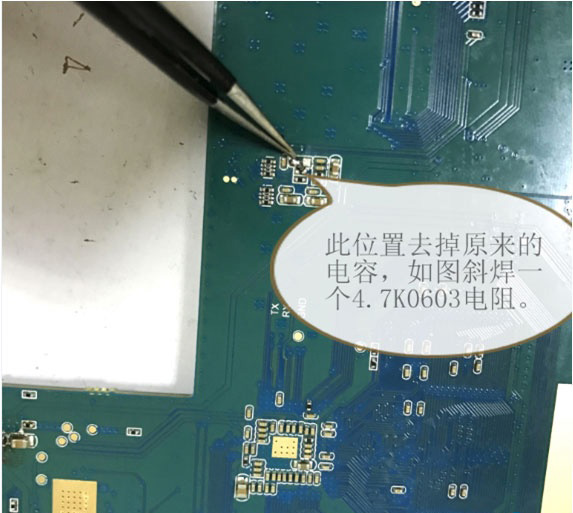
Procedure 1:  Change C6 capacitor
Position: C6
Name: Chip capacitor
Chip specification: 4.7UF/10V  0603
1.Disassemble the C6 capacitor and desolder a 4.7K 0603 resistor


Procedure 2: Remove transistor
Position: Q14


Name: S8050
Chip specification:  0.1uF/50V 0402
1.Disassemble the Q14 transistor.
Procedure 3: Change C123 capacitor
Position: C123
Name: Chip capacitors
Chip specification:  0.1uF/50V 0402
1.Replace the C123 capacitor with a 3.3K%5  0402 resistor.


More products about XTOOL,check here:
http://www.obd360.com/wholesale/original-xtool-diagnostics/

2019年3月13日星期三

How to Use Handy Baby 2 to Renew BMW Remote

This post show a guide on how to use Handy Baby 2 to renew BMW remote.

What You Need?
–JMD Handy Baby II Programmer
–Super Chip (S-JMD)
-IOS APP or Android APP with Bluetooth
-BMW Remote
– The Unlock line in the package
jmd-handy-baby-ii-for-bmw-remote-renew-01

Steps:
1.Scan the Handy Baby II APP QR code to download IOS or Android client. (For PC APP, it requires to active).
Install APP.
Register a user name
Bind Handy Baby II machine with the serial number.
***Check register and activation guide
jmd-handy-baby-ii-for-bmw-remote-renew-02 jmd-handy-baby-ii-for-bmw-remote-renew-02 jmd-handy-baby-ii-for-bmw-remote-renew-02
2.Plug the remote line to the S-JMD chip (in red color) , and another end to the Handy Baby II.
jmd-handy-baby-ii-for-bmw-remote-renew-05 jmd-handy-baby-ii-for-bmw-remote-renew-06
3.Pair the Bluetooth in the Handy Baby II and the Bluetooth in the mobile app.
jmd-handy-baby-ii-for-bmw-remote-renew-07 jmd-handy-baby-ii-for-bmw-remote-renew-08
4.Tap “JMD remote”, then “Honda “, then “CRV”, then tap “Create remote”, then choose “Wired”.
jmd-handy-baby-ii-for-bmw-remote-renew-09 jmd-handy-baby-ii-for-bmw-remote-renew-10 jmd-handy-baby-ii-for-bmw-remote-renew-11
5.This is remote and unlock line.
jmd-handy-baby-ii-for-bmw-remote-renew-12
6.This is BMW remote.
jmd-handy-baby-ii-for-bmw-remote-renew-13
7.Connect the cable by following the wiring diagram .
jmd-handy-baby-ii-for-bmw-remote-renew-14
8.Insert to Handy Baby II and BMW remote insert into the coil.
jmd-handy-baby-ii-for-bmw-remote-renew-15
9.Select “Remote”.
jmd-handy-baby-ii-for-bmw-remote-renew-16 jmd-handy-baby-ii-for-bmw-remote-renew-17
10.Take off the BMW remote, select “Remote”, then “Remote renew”, then “BMW” and “5WK49125”.
Please use the unlock line to connect the key.
Press OK to writing.
Write successfully.
jmd-handy-baby-ii-for-bmw-remote-renew-18 jmd-handy-baby-ii-for-bmw-remote-renew-19 jmd-handy-baby-ii-for-bmw-remote-renew-20 jmd-handy-baby-ii-for-bmw-remote-renew-21 jmd-handy-baby-ii-for-bmw-remote-renew-22 jmd-handy-baby-ii-for-bmw-remote-renew-23

Done

2019年2月25日星期一

VIDENT iAuto700 All System scan tool Register Guide

Step 1: find out the VIDENT iAuto700 serial number and password for registration.
Please connect the VIDENT iAuto700 scanner with a computer with the USB cable provided to boots up it. Select “Setup” on the menu, then “About” and you can see “Product serial number” and password.
Take the user S/N# 7000315001361 for example.
vident-iauto700-registration-01 vident-iauto700-registration-02 vident-iauto700-registration-03
Step 2: login the official site to register.
http://www.videnttech.com/register/step_two.html
As required, to input user ID, password, first name & last name, Country, phone, email and captcha etc.
vident-iauto700-registration-04
Or you can download the “iAuto700 software Update client” to install on your computer to register. Firstly click on “Update client and manuals” and then “iAuto 700“.
vident-iauto700-registration-04

Article from:http://blog.obd360.com/how-to-register-vident-iauto700-all-system-scan-tool/

2019年2月13日星期三

CGDI BMW Programmer BMW Coding and Programming Function

CGDI BMW update engineering function incl. G / F /E programming & coding.
CGDI BMW
  1. CGDI BMW can program the following G F E models :
    1)E60(E60\E61\E63\E64
    2) E65(E65\E66\E67\E68)
    3)E7O(E7O\E71\E72)
    4) E89(E81\E82\84\ E87\E88\E90\E91\E92\E93)
    5) R56(R55,R56,R57,R58,R59,R60,R61)
    6) F001(F001,F002,F003,F004,F007,RRO4,RRO5, RRO6
    7) F010(F005,F5006,F010,F011,F012,F013,F018)
    8) F020(F020,F021,F022,FO23,F030,F031,F032,F033
    F034,F035,F036,F080,F082,F083,F087,F088)
    9) F025(F015,F016,F025,F026,F085,F086)
    10) FO56(F039,F045,F046,F047,F048,F049,F052, F054,FO55,F056,F057,F060)
    11) G070(G070,G071)
    12) I001(1001,1012,1015)
    13) KO01(K010,K018,K019,KO21,KO22,K023,K032,K033,K034,KO35,K045,K046,K047,K048,K049
    K050,K051,KO52,K053,KO54,K061,K067,K069,K080,K081,K082,K083,K084)
    14) KEO1(K017)
    15) M013(M013)
    16) KSO1(K002,K0O03,K008,K009,K060
    17) S15A(F090,F097,F098,G001,G002,G011,G012,
    G013,G030,G031,G032,RR11,RR12,RR31)
    18) S15c(G008,G038)

  1. Workable modules
Support the modules communicating with K-line and Can bus line , including gateway, airbag, engine, transmission, CAS, dashboard, air conditioning, light module, Footwell Module (FRM) etc.
The unsupported modules: the modules that need Fiber Optic CAN bus and the other bus lines, such as: multimedia display, radio, car information computer etc.

  1. Capabilities
Program the BMW car modules.
Can reprogram the broken module if the module can be communicated.
Automatically read and display the car model and VIN number.

2.CGDI BMW can code for the following BMW G /F /E models:
1) E60(E60\E61\E63\E64
2) E65(E65\E66\E67\E68)
3) E7O(E7O\E71\E72)
4) E89(E81\E82\84\ E87\E88\E90\E91\E92\E93)
5) R56(R55,R56,R57,R58,R59,R60,R61)
6) F001(F001,F002,F003,F004,F007,RRO4,RRO5, RRO6
7) F010(F005,F5006,F010,F011,F012,F013,F018)
8) F020(F020,F021,F022,FO23,F030,F031,F032,F033
F034,F035,F036,F080,F082,F083,F087,F088)
9) F025(F015,F016,F025,F026,F085,F086)
10) FO56(F039,F045,F046,F047,F048,F049,F052, F054,
FO55,F056,F057,F060)
11) G070(G070,G071)
12) I001(1001,1012,1015)
13) KO01(K010,K018,K019,KO21,KO22,K023,K032,
K033,K034,KO35,K045,K046,K047,K048,K049
K050,K051,KO52,K053,KO54,K061,K067,K069
K080,K081,K082,K083,K084)
14) KEO1(K017)
15) M013(M013)
16) KSO1(K002,K0O03,K008,K009,K060
17) S15A(F090,F097,F098,G001,G002,G011,G012,
G013,G030,G031,G032,RR11,RR12,RR31)
18) S15c(G008,G038)

  1. Testable modules
Support the modules communicating with K-line and Can bus line , including gateway, airbag, engine, transmission, CAS, dashboard, air conditioning, light module, Footwell Module (FRM) etc. The specific module will be known according to the car’s configuration information.

  1. Capabilities
1) Backup & coding, restore coding, coding etc.
2) To set code for the module after the car module is programmed or replaced.
3) Automatic read and display the car model and VIN number.

www.obd360.com

Article from:http://blog.obd360.com/cgdi-bmw-update-g-f-e-programming-coding-works/

2019年1月18日星期五

How to Use Yanhua Mini ACDP Read/Write Jaguar/Land Rover?

In this article i want to show you how to use Yanhua Mini ACDP to read and write EEPROM for Jaguar & Land Rover?And for more about Yanhua Mini ACDP you can search here:http://www.obd360.com

Procedure:
In the left rear of the car, open the plaque, see the fuse box, remove the fuse box and see the RAF smart computer
raf-smart-computer-01

Connect Yanhua ACDP to OBP+ ICP adapter, then to BDM adapter, then to KVM adapter. Wait the indicator turn red then green.
yanhua-mini-acdp-connects-land-rover-kvm-module-02 yanhua-mini-acdp-connects-land-rover-kvm-module-02

Click on “LandRover” option.
yanhua-acdp-program-landrover-kvm-mc9s12xeq384-3m25j-04

Click on ” KVM (MC9S12XEQ384 112Pin)”.
yanhua-acdp-program-landrover-kvm-mc9s12xeq384-3m25j-04

Click on “IMMO”.
yanhua-acdp-program-landrover-kvm-mc9s12xeq384-3m25j-04

Come to the main menu:
MC9S12XEQ384_0M12S
MC9S12XEQ384_1M12S
MC9S12XEQ384_2M25J
MC9S12XEQ384_3M25J
yanhua-acdp-program-landrover-kvm-mc9s12xeq384-3m25j-07

Choose ” MC9S12XEQ384_3M25J”
yanhua-acdp-program-landrover-kvm-mc9s12xeq384-3m25j-08

Click on ” Add key auto mode”
Starting application.
Device connection succeed.
Note: Please prepare the OBP+ICP adapter, BDM adapter, KVM module, BAV adapter and Blank key.
yanhua-acdp-program-landrover-kvm-mc9s12xeq384-3m25j-09

Follow the tip to ensure the well connected for ACDP device, OBP +ICP adapter, BDM adapter and KVM module.
yanhua-acdp-program-landrover-kvm-mc9s12xeq384-3m25j-10

Detecting pins status, please wait..
Good contact and continue.
yanhua-acdp-program-landrover-kvm-mc9s12xeq384-3m25j-11 yanhua-acdp-program-landrover-kvm-mc9s12xeq384-3m25j-12

Configuring adapter, please wait…

It is detected the KVM module chip has been encrypted, whether to continue? click on “Continue”.
yanhua-acdp-program-landrover-kvm-mc9s12xeq384-3m25j-12

Configuring adapter, please wait…
Decrypting the chip, please wait… It will take several minutes.

Reading chip PFLASH data, please wait…

Please save the original PFLASH data of the KVM module.
yanhua-acdp-program-landrover-kvm-mc9s12xeq384-3m25j-14

Uploading data…
yanhua-acdp-program-landrover-kvm-mc9s12xeq384-3m25j-15

File save path.
yanhua-acdp-program-landrover-kvm-mc9s12xeq384-3m25j-16

Reading chip EEPROM /PFLASH data, please wait…
yanhua-acdp-program-landrover-kvm-mc9s12xeq384-3m25j-17

Please save the original EEPROM data of the KVM module.
yanhua-acdp-program-landrover-kvm-mc9s12xeq384-3m25j-18 yanhua-acdp-program-landrover-kvm-mc9s12xeq384-3m25j-19

Just click “Yes” until you see the immo info shown as below.
yanhua-acdp-program-landrover-kvm-mc9s12xeq384-3m25j-19

Just follow the on-screen instruction to do .

Please choose to add the keyway.
Choose key 6.
yanhua-acdp-program-landrover-kvm-mc9s12xeq384-3m25j-21
…
Just follow the on-screen instruction to operate.
One more time, it will show “Decrypting the chip, please wait… ” and it will take several minutes again.
Next is writing chip EEPROM /Plash data, please wait…
Checking chip data, please wait.

Adding the key complete. Please install the KVM module to the car and confirm that the new key can be used normally.
yanhua-acdp-program-landrover-kvm-mc9s12xeq384-3m25j-22

Done.

PS: just use the same way to program new key when all keys lost. 


Article from:http://blog.obd360.com/how-does-acdp-read-write-jaguar-land-rover-kvm-data-via-icp/